There are lots of different ways to download a web page using PHP, but which is the fastest? In this post I will go through as many different methods of downloading a web page and test them to see which is the quickest.
Here is a list of the different methods.
- The PHP curl library.
- Snoopy the PHP web browser. Bascially a wrapper for fsockopen.
- fsockopen().
- fopen() with feof().
- fopen() with stream_get_contents().
- file() and then implode().
- file_get_contents() function.
Each method will be run and will retrieve the contents of a web page 50 times each in order to get a decent spread of times. On each run the time will be recorded into an array, this array will then be used at the end to calculate some statistics.
Part of the test will be to do nothing to see how much time PHP spends running the benchmarking functions.
Also, I will run the functions for two different types web pages, one with lots of content and one with no content as this will show the base speed of the function. The hashbangcode.com server will be used as part of the test, but I will also use the php.net site to see what effects a site with high bandwidth has on the results.
The start of the code will be setting up the variables for the rest of the test.
<?php
// increase the amount of time available for the functions to run.
set_time_limit(1234);

// include the Snoopy class
include 'Snoopy.class.php';

// initialise variables
$contents = '';
$times = array();

// set URL
$url = 'http://www.hashbangcode.com/';

// set domain - used for fsockopen()
$domain = 'www.hashbangcode.com';

// generate microtime value
function getmicrotime($t){
  list($usec, $sec) = explode(" ",$t);
  return ((float)$usec + (float)$sec);
}
Now that is all set up we can run through each of the methods and record the times.
for ($i = 0; $i <= 50; ++$i) {
 ////////////////////////////////////////////////////////////////////////////////////
 // doing nothing
 $start = microtime();
 $end = microtime();
 $times['nothing'][] = (getmicrotime($end) - getmicrotime($start));

 ////////////////////////////////////////////////////////////////////////////////////
 //curl
 $start = microtime();

 $ch = curl_init();
 $user_agent = "Mozilla/4.0";
 curl_setopt ($ch, CURLOPT_URL, $url);
 curl_setopt ($ch, CURLOPT_USERAGENT, $user_agent);
 curl_setopt ($ch, CURLOPT_HEADER, 1);
 curl_setopt ($ch, CURLOPT_RETURNTRANSFER, 1);
 curl_setopt ($ch, CURLOPT_FOLLOWLOCATION, 1);
 curl_setopt ($ch, CURLOPT_TIMEOUT, 120);
 $contents = curl_exec($ch);
 curl_close($ch);

 $end = microtime();
 $times['curl'][] = (getmicrotime($end) - getmicrotime($start));

 ////////////////////////////////////////////////////////////////////////////////////
 //snoopy
 $start = microtime();

 $snoopy = new Snoopy();
 $snoopy->fetch($url);
 $contents = $snoopy->results;

 $end = microtime();
 $times['snoopy'][] = (getmicrotime($end) - getmicrotime($start));

 ////////////////////////////////////////////////////////////////////////////////////
 //fopen
 $start = microtime();

 if($handle = @fopen($url, "r")){
  while(!feof($handle)){
   $contents .= fread($handle, 4096);
  }
  fclose($handle);
 }

 $end = microtime();
 $times['fopen'][] = (getmicrotime($end) - getmicrotime($start));

 ////////////////////////////////////////////////////////////////////////////////////
 //fopen with stream_get_contents
 $start = microtime();

 if($stream = fopen($url, 'r')){
  $contents = stream_get_contents($stream);
  fclose($stream);
 }

 $end = microtime();
 $times['stream'][] = (getmicrotime($end) - getmicrotime($start));

 ////////////////////////////////////////////////////////////////////////////////////
 //file
 $start = microtime();

 $html = implode('', file($url));

 $end = microtime();
 $times['file'][] = (getmicrotime($end) - getmicrotime($start));

 ////////////////////////////////////////////////////////////////////////////////////
 // fsockopen
 $start = microtime();

 $fp = fsockopen($domain, 80, $errno, $errstr, 30);
 if(!$fp){
  $contents .= $errstr.' ('.$errno.')<br />';
 }else{
  // send headers
  $out = "GET ".fsockopen($domain, 80, $errno, $errstr, 30)." HTTP/1.1\r\n";
  $out .= "Host: ".str_replace('http://'.$domain,'',$url)."\r\n";
  $out .= "User-Agent: FSOCKOPEN\r\n";
  $out .= "Connection: Close\r\n\r\n";
  fwrite($fp, $out);
  while(!feof($fp)){
   $contents .= fgets($fp, 4096);
  };
  fclose($fp);
 };
 $end = microtime();
 $times['fsockopen'][] = (getmicrotime($end) - getmicrotime($start));

 ////////////////////////////////////////////////////////////////////////////////////
 //file_get_contents
 $start = microtime();

 $contents = file_get_contents($url);

 $end = microtime();
 $times['file_get_contents'][] = (getmicrotime($end) - getmicrotime($start));
}
Now that is all complete we can now do something with the times. First I sorted the times and then worked out simple things like average, minimum and maximum time taken.
// sort the times
sort($times['nothing']);
sort($times['curl']);
sort($times['snoopy']);
sort($times['fopen']);
sort($times['stream']);
sort($times['file']);
sort($times['fsockopen']);
sort($times['file_get_contents']);

// print out the times
echo '<pre>'.print_r($times,true).'</pre>';

// calculate stats for times
foreach ($times as $method=>$time){
  echo '<p>'.$method.' average = '.(array_sum($time)/count($time)).'<br />min = '.$time[0].'<br />max = '.$time[count($time)-1].'</p>';
}
Here are the results for downloading a blank web page. I won't print out all of the times as this would take up a lot of space and be utterly pointless.
nothing average = 7.320852840648E-6
min = 5.0067901611328E-6
max = 1.6927719116211E-5

curl average = 0.083804859834559
min = 0.073469161987305
max = 0.16210603713989

snoopy average = 0.089839958677105
min = 0.074288129806519
max = 0.14481902122498

fsockopen average = 0.13405424005845
min = 0.10800695419312
max = 0.39040613174438

fopen average = 0.12635245042689
min = 0.10596394538879
max = 0.19953107833862

stream average = 0.1248401520299
min = 0.10655999183655
max = 0.17397904396057

file average = 0.12469244470783
min = 0.10594987869263
max = 0.19219899177551

file_get_contents average = 0.12691019095627
min = 0.10590195655823
max = 0.17201805114746
Here are the results for accessing the front page of the hashbangcode.com site, which is 27.17 kB.
nothing average = 7.9659854664522E-6
min = 5.0067901611328E-6
max = 4.2915344238281E-5

curl average = 0.40228473438936
min = 0.34250092506409
max = 1.2593679428101

snoopy average = 0.37644760748919
min = 0.34368300437927
max = 0.60013008117676

fsockopen average = 0.12776509920756
min = 0.10803699493408
max = 0.22104907035828

fopen average = 0.41444192213171
min = 0.37545895576477
max = 0.77188587188721

stream average = 0.41173196306416
min = 0.37820982933044
max = 0.62948799133301

file average = 0.40511836725123
min = 0.3781590461731
max = 0.69333410263062

file_get_contents average = 0.41732146693211
min = 0.37894988059998
max = 0.68813395500183
Here are the results for accessing the front page of the php.net site, which is 31.13 kB.
nothing average = 7.9566357182521E-6
min = 5.0067901611328E-6
max = 4.1961669921875E-5

curl average = 1.3938542253831
min = 1.0989301204681
max = 1.7416069507599

snoopy average = 1.3927017473707
min = 1.1879198551178
max = 1.6753461360931

fsockopen average = 0.61519114176432
min = 0.56387495994568
max = 1.0507898330688

fopen average = 1.7791449415917
min = 1.5167849063873
max = 5.4117441177368

stream average = 1.6853758213567
min = 1.4832580089569
max = 2.3599371910095

file average = 1.7028319742165
min = 1.4881958961487
max = 2.3575241565704

file_get_contents average = 1.7295382069606
min = 1.5339889526367
max = 2.5368640422821
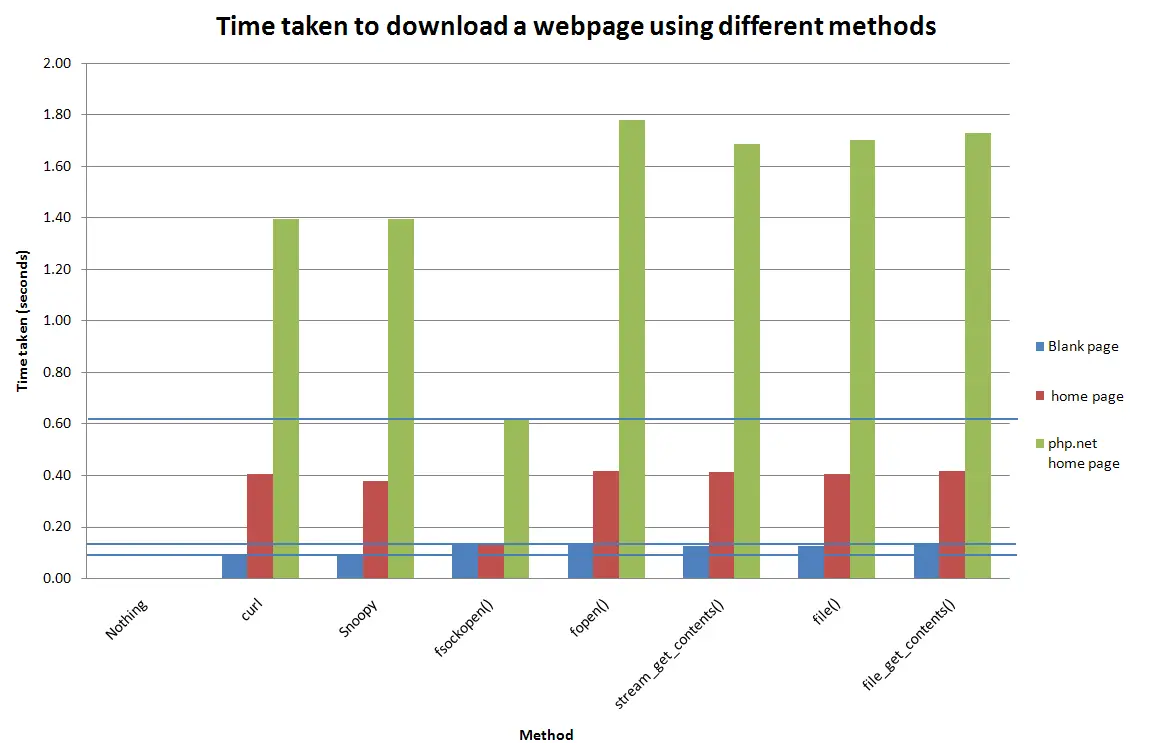
Here is a graph of the results.

The results show that if the page you are downloading has any content then the quickest way to download a web page is to use fsockopen(). If the page has little or no content then you are best off using curl() as fsockopen() seems to perform worst with this.
So fsockopen() is the quickest way to get a web page. However, it is probably best to use Snoopy to do all of your fsockopen() calls as there is no point in reinventing the wheel to accomplish a simple task. If you really need the speed and are sure that you will always use the same page then use your own fsockopen() function. Snoopy does ass some overhead, but I think the benefits of using Snoopy outweigh the drop in speed.
What was odd with the data was the amount of time difference between downloading the home page of hashbangcode.com and php.net. I expected the php.net server to take less time, and although fsockopen() was far quicker than any other method, the slowest method took more than a second to download the php.net site than the hashbangcode.com site. There is a page size difference of about 3 kB, but this is not enough to effect the result like this. The only thing I can think of is that the distance is of the php.net server is causing this speed difference. I ran the results on my own computer in the UK, and the php.net server is hosted in the USA.
Doing nothing takes about 0.000008 seconds in all cases, which is no time at all really and shows that the benchmarking function contributes a tiny amount of time to the overall time taken. This time could be taken away from the time taken for each method to give a more realistic result.
If you have any other method that I have missed then post a comment and let me know. Also, it would be interesting if people ran this on their own computers/hosts in order to find out a global average time as there are other factors involved in altering these times. If you run this test then let please send me the results so that I can collate them.

onymous