The Search API Solr Search module has a bunch of controls for boosting certain fields. This allows you to give more weight (i.e. boost) to the title and less weight to the body, which means that when a search term appears in the title of a page it has more weight than a page that only has the term in the body. This weight value is ultimately used to calculate the score of the page and this directly effects the ordering of results.
One thing that needs a little bit more work is the concept of date weighting. Let's say that you want to control the boosting of a date field based on how recent the page was published so that more recent pages are given a bigger score and therefore appear higher up the search results. There are no controls in the Search API Solr module to handle this so we need to create some custom code to accomplish this. Thankfully, the way Solr works here is that the search query contains the boosts, rather than the index, and so all we need to do is alter the query to change the boost factors. You don't need to reindex the entire site in order to update the boosts.
The hook we need here is hook_search_api_solr_query_alter(), creating a module called boost_search we would create a module file that looks like this.
<?php

use Solarium\QueryType\Select\Query\Query;
use Drupal\search_api\Query\QueryInterface;

/**
 * Implements hook_search_api_solr_query_alter().
 */
function boost_search_search_api_solr_query_alter(Query $solarium_query, QueryInterface $query) {
  // Implement this.
}
If you used Solr configured to work with Drupal for a while then you will realise that Solr converts the fields you give it to have different names based on their cardinality and data type. For this reason it is not always possible to just 'get' the field, so we first need to ask the search index what the field is called in the Sorl server. Once we have this we can look at how to create the boost.
function boost_search_search_api_solr_query_alter(Query $solarium_query, QueryInterface $query) {
  $index = $query->getIndex();
  $fields = $index->getServerInstance()
    ->getBackend()
    ->getSolrFieldNames($index);
  $solrField = !empty($fields[$dateField]) ? $fields[$dateField] : '';

}
Adding a boost to the search query can be done using the addParam() method. The first parameter is bf, which adds boost functions to the query, the second parameter details the boost function we want to apply. Boost functions will be used to construct function queries which will be added to the user’s main query as optional clauses that will influence the score. Function queries enable you to generate a relevancy score using the actual value of one or more numeric fields. Any function supported natively by Solr can be used in the bf field, along with a boost value.
$solarium_query->addParam('bf', "... boost ...");
To create a boost based on the time a page was published we need to use the recip(x,m,a,b) Solr function. This is a reciprocal function that implements f(x) = a/(m*x+b) where m, a, and b are constants and x is any numeric field.
$solarium_query->addParam('bf', "recip(abs(ms(NOW,{$solrField})),3.16e-11,10,0.1)");
Let's break down each part of this boost function in turn. Breaking up the recip(x,m,a,b) function we get the following parts.
x = abs(ms(NOW, {$solrField))
This essentially means that we want to show the difference (in milliseconds) between the current time and the date from the field we stipulated in the boost. Passing this through abs() means that it is automatically converted to a positive number.
m = 3.16e-11
m is a constant that defines a timescale which is used to apply a boost. It is relative to what we would consider an 'old' document and
is the inverse age (hence the -11) of the document in milliseconds. This is currently set to be 3.16e-11, which means that the cut off point for our article boost will be roughly 1 year. We can work out different amounts by using the formula 1/(milliseonds), so if you want the value to be 6 months then it would be 6.3411541e-11, for 3 months this would be 1.2683917e-10.
a = 10
b = 0.1
The final two values are constants that effect the curve of the function. Lower values mean that the line drops off quickly, a value of 1 for each will mean very shallow line that doesn't give much boost and goes heads downwards slowly. The values used above create an aggressive downwards curve.
To better demonstrate what different values do to the boost function I have graphed out a few values using the same value of 3.16e-11 for the m factor.
A - a=10 b=0.1
B - a=1 b=1
C - a=1 b=0.1
D - a=50 b=10
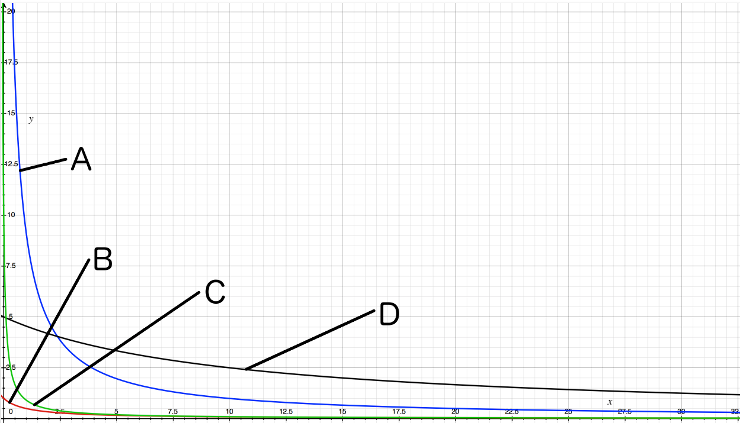
As you can see from this example, all values produce a curve. The Y axis represents the score and the X axis represents the time. Altering the values in a and b causes the curve to change shape but larger values cause a more shallow curve. This shows that if you use a=10 and b=0.1 (A in the graph above) then more recent articles will receive a massive boost in the search results, whereas using a=1 and b=1 (B) gives a very small boost to more recent articles.
Putting this all together we get the following.
<?php

use Solarium\QueryType\Select\Query\Query;
use Drupal\search_api\Query\QueryInterface;

/**
 * Implements hook_search_api_solr_query_alter().
 */
function boost_search_search_api_solr_query_alter(Query $solarium_query, QueryInterface $query) {
  $dateField = 'created';
  $index = $query->getIndex();
  $fields = $index->getServerInstance()
    ->getBackend()
    ->getSolrFieldNames($index);
  $solrField = !empty($fields[$dateField]) ? $fields[$dateField] : '';

  if ($solrField) {
      $solarium_query->addParam('bf', "recip(abs(ms(NOW,{$solrField})),3.16e-11,10,0.1)");
    }
  }
}
The values used here will give a very large boost to more recent articles. You should experiment with different values of a and b and see how they alter your search results.
One extra thing you can do is to wrap the recip() function in a min() function. This will mean that your minimum boost will not drop below 0.5, or whatever value you set. This can be handy if you find old and relevant articles are not getting enough of a boost. I have had limited success with this, but I add it here in case you find it useful.
$solarium_query->addParam('bf', "min(recip(abs(ms(NOW,{$solrField})),3.16e-11,10,0.1), 0.5)");
Comments
Thank you for your post but it's not working for us.
I've tried your code with and without boost with a date field : the score are the same. No change, while I've configured scored and dates in Drupal interface of solr.
Is there any configuration to create in solr schema, config or in Drupal ?
Regards.
Submitted by bibi on Tue, 10/23/2018 - 08:22
PermalinkThis worked with the Solr configuration from the SearchAPI module, and also worked with the default configuration on our host.
Not sure why it wouldn't be working, I don't think there was anything special in the project that would stop this working.
Submitted by philipnorton42 on Tue, 10/23/2018 - 14:16
PermalinkThanks for the article! it was extremely useful for me. As a suggestion for improve, it was not clear for me what the X axis would represent in your graph. I assume it's the age of content in days? or is it months? It would be worth clarifying explicitly.
Submitted by Ruth del Campo on Fri, 12/14/2018 - 04:39
PermalinkGlad you liked it :)
Good point. I totally forgot to label my axis!
The Y is a representation of score, the X is a representation of time. They aren't actual values in use here, just representation of the kind of tail-off that you would expect to see with different values.
Submitted by philipnorton42 on Fri, 12/14/2018 - 11:04
PermalinkThank you so much for this post. This was very helpful. Would you be able to tell us how do we add a score for a value in a field that is on Search API index?
For instance, I have a domain field which is indexed. It has several Domain URLs. I want to rank some values higher in the search results based on the domain value for the keywords that I search in.
Any help? Greatly appreciated.
Thank you.
Submitted by Ravikiran on Mon, 06/03/2019 - 11:56
PermalinkThe thing with domain names is that it's a non contiguous series, so you'll probably need to create a matrix to translate domains into scores. A very simple example might be something like this:
Submitted by philipnorton42 on Tue, 06/04/2019 - 08:53
PermalinkThank you Philip. How would this work if I have enabled field level boost scores and also type specific boost scores? Will this behave properly?
So I am looking at this in this way:
Let me know your thoughts.
Submitted by Ravikiran on Tue, 06/04/2019 - 13:42
PermalinkYou'll just have to be sure of what search parameters you are using. Remember that the boosts are kept in the query and not in the index so it's the query that governs how your results will be ordered. The way to check this is to see the search result score on each item you get back from the query. That will show you how you have influenced the scores and therefore the ordering of the elements. I found the Solr dashboard was useful here in determining the correct query parameters, instead of relying on Drupal's score overrides in this instance.
Submitted by philipnorton42 on Tue, 06/04/2019 - 14:39
PermalinkHow can this process be implemented for Drupal 8. I was to add custom some check prior to executing the solr query
Submitted by Mangesh on Mon, 05/11/2020 - 21:44
PermalinkI found that I had to add an additional parameter to get this to work.
Submitted by Will Hartmann on Mon, 08/23/2021 - 22:48
PermalinkAdd new comment