I've been happy with my Kobo Aura ebook reader since I bought it 8 years ago. It's light, has a crystal clear e-ink display, a decent back light, and the battery still lasts quite a long a while. I've read many books on it, most of which I have bought through the Kobo store. The DRM free service they provide is very convenient and give me access to a wide selection of books for a reasonable price.
When I go travelling I never take the Kobo Aura with me as it's a bit of an awkward size. It's larger than a phone and smaller than a tablet so it could easily fit into luggage, but it just never occurs to me to take it with me. I normally read ebooks on my phone via the Kobo app.
I wasn't in the market for a new ebook reader at all, but when I saw the Xteink X4 pocket reader I was intrigued enough to look into it. I've been trying to use my phone less over the last couple of years, including uninstalling most social media apps, so a stand alone and small ebook reader appealed to me.
The Xteink X4 Pocket Reader is a stand alone ebook reader that is just slightly bigger than a credit card. I've had the X4 for about 3 months now and I like to really try out these devices before writing about my experiences with them. In this article I will look at the X4 reader, including the custom firmware I use on the device, and the sourcing books to read.
After initially looking into the X4 a little I thought it was some kind of Apple specific device as they leaned heavily into that aspect in every bit of marketing across social media and their website. Since I don't have an iPhone I thought nothing more of it and left it alone.
After a few weeks I started seeing the X4 appear on YouTube channels I subscribe to, on blogs I read, and even people raving about it on Mastodon. In fact, it was difficult to get away from seeing a review of it for much of the summer. That's when I took another look to see exactly what it was, especially since I learned that the price was about £50.
The X4 has an ESP32 chip and people have been building different firmware for the device to extend the functionality of the stock firmware. As a result, depending on the firmware you install, it can read different formats of ebook. The fact that the X4 is essentially a hackable device really appealed to me.
Until very recently the Xteink website was an absolute disaster and everything about it looked like an utter scam. Thankfully they have changed it all and it looks much better, but it meant that I looked elsewhere to purchase one. They were available on AliExpress, but I make it a rule never to spend more than £20-30 on anything on AliExpress since it's such a crazy mix of scams and AI slop. There's also a danger of buying a locked model on AliExpress that you couldn't flash with custom firmware.
I ended up buying my X4 on ebay, from a supplier that threw in a number of accessories, like a case, a little SD card reader, a screen protector, and even a 3D printed desktop stand.
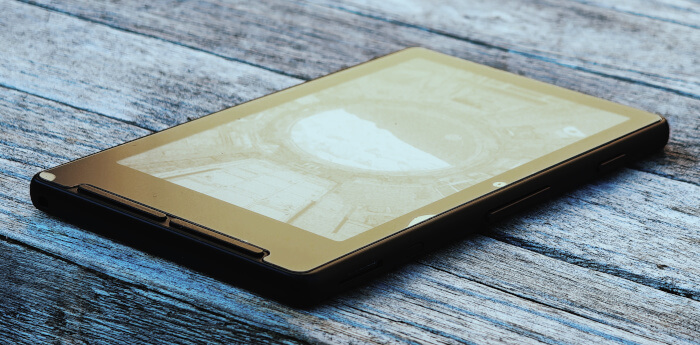
For those interested, let's look at the specification of the X4.
Specs
Here are the (modest) specs of the X4.
- 4.3" 800x480 E-Ink Display with 1-bit mono
- Dimensions: 114mm x 69mm. 5.9mm thick.
- Wi-Fi 2.4 GHz & Bluetooth
- Weight: 77g
- PPI: 219
- USB Type-C connection
- 650 mAh battery
- Magnetic back
- 7 buttons including a physical power, navigation, and page-turn buttons (4 front, 3 side)
The X4 will last for around 14 days, based on 1-3 hours of reading per day.
The chip on the X4 is a ESP32-C3, running at 160MHz.
Screen Protector
Applying the screen protector was annoying and in my case not entirely successful. I got a couple of bubbles in the right hand side of the screen and one in the lower left corner, which you can see in the pictures in this article. Since they are small and on the bezel I don't see them too much, especially when reading at night, but they are highly annoying.
I still have no idea why companies don't just supply devices with screen protectors already applied.
MicroSD Card
The reader usually comes with a small 32GB or 16GB MicroSD card, which is used to store books, wallpapers, your options and your reading progress. The 16GB cards were introduced in late 2025 to replace the 32GB cards so there's a good chance that your reader comes with a 16GB model.
The free MicroSD card is, however, not reliable to say the least. It's probably best to remove that and leave it alone or use it for anything you don't care about too much. There are reports of the X4 getting hot due to the default SD card, but you are quite likely to see the card corrupt and delete your books (and reading progress).
The largest supported MicroSD card is 512GB but you don't need a large SD card; even 256GB will hold thousands of books that will take you a lifetime to read.
The MicroSD card must be formatted as exFAT.
The X4 will not add directories or attempt to organise your books for you, you'll need to do that yourself. It's a good idea to add a directory called "books" to the root of the SD card and then organise things within that directory. You can have nested folders by author, or subject, or whatever suits.
I transfer books to the X4 by taking the card out of the reader and putting it into a computer. I'll add 2 or 3 books at a time, which gives me a few weeks of reading.
Firmware
If you bought your X4 directly from Xteink then it will come with a proprietary OS for the device. What really interested me is that there are now a collection of custom firmware that you can easily flash to the unit to provide different purposes.
My X4 came with a firmware called CrossPoint, which was pre-installed by the seller I bought the device from (via ebay) so I have no idea what the stock firmware was like. CrossPoint, though, is excellent. It's a community-built firmware that's easy to install and has lots of support for the different variants of the X4 as well as other eink/reader devices. You can configure the reading of books with different custom fonts, different types of text justification and hyphenation, reading orientation, bookmarks, and even a built in dictionary. The reading experience is very slick indeed.
It's even possible to take screenshots of pages inside CrossPoint, like this one I took of the homepage of the firmware.
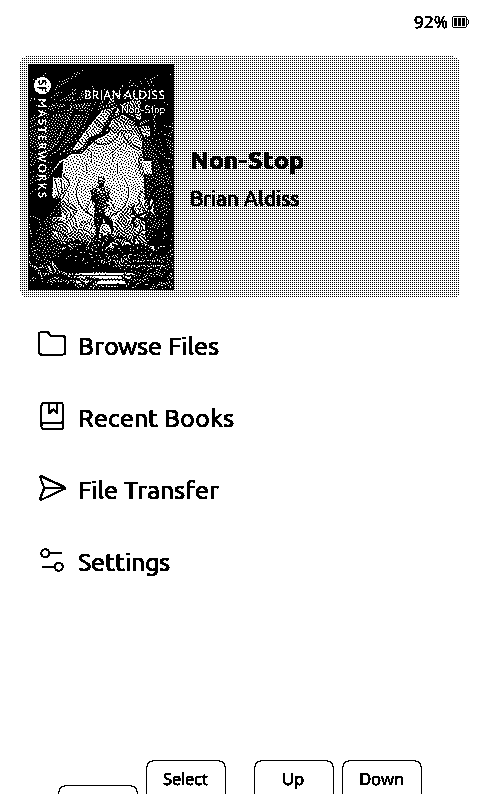
The ability to swap firmware on the device is really interesting to me. I have my father's old Kindle sat in my office and I've been reading about how to hack it so it can be of some use. All of the hacks are to do with severing the connection with Amazon and not installing a custom firmware, which is highly limiting. The fact that you can install CrossPoint or any other firmware easily means that the device has a much longer life than normal.
What I found really interesting is that if you are running the CrossPoint firmware then you can connect to you local WiFi and visit a web server on the device to manage the available files on the device. On the home screen of you X4, select File transfer and then Join a Network. The device will then tell you the IP address of the device that you can type into your browser to connect to it.
You should see something like this in your browser.
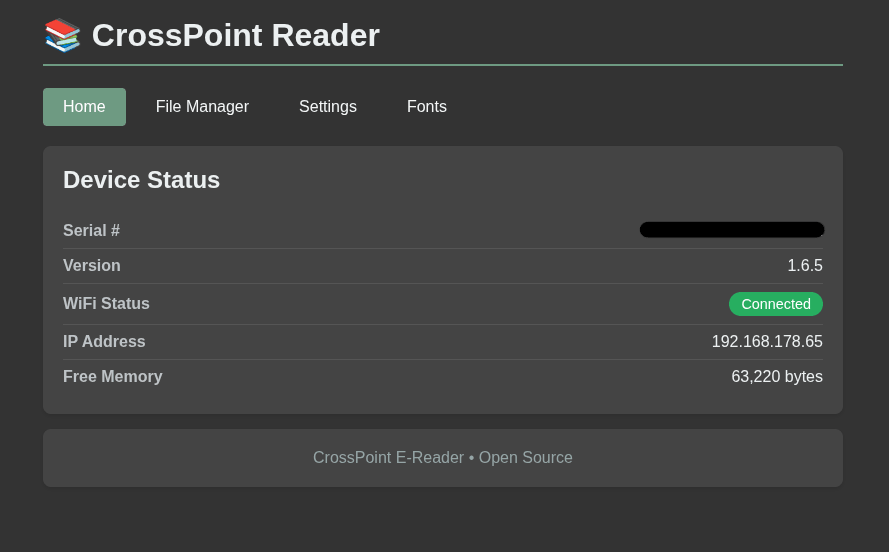
Bear in mind that the WiFi signal on the X4 is terrible, so you should put the device basically next to your access point to be able to successfully transfer files. I think the signal strength is to do with the internal areal and metal body of the device.
Direct file transfer using the sd card is easier, faster, and more reliable then WiFi, but the WiFi method is very conveient.
Other firmware options that might be of interest are:
- PapyriX - A lightweight firmware that is a fork of CrossPoint, aimed at
- Casper - A fork of CrossPoint that aims to provide custom themes for the reader.
- TRMNL - This is a stand alone device that will show you calendar information, to do lists, or event the current weather. It's possible to flash TRMNL to your X4 and use that as a stand alone display.
Note that if you plug your X4 into your computer via a USB cable and it is not detected then the device is "locked" and your firmware options are somewhat limited. You can flash firmware using the emergency recovery option, but you may end up locked to a firmware that doesn't have an emergency recovery option itself.
File Format
This is where things get a little complicated. CrossPoint is able to read .epub, .xtc/.xtch, .txt and .bmp files. The best reading experience is with epub as the firmware is built around reading and displaying that format.
I use Kobo to buy most of my ebooks, and whilst I can download the books they download as .acsm files. This is an DRM XML format that doesn't contain the content of the book and is instead a pointer to the actual book content. The book needs to be converted from this file format into an .epub format so that the X4 can read it.
To convert the file I use a service called ACSM converter, which is a proxy around a converter service. It's open source (mostly) but seems to work well.
You can also install a program called Calibre on your computer that can convert .acsm files as well as manage your ebook collection. CrossPoint also has support for communicating with Calibre, so that might be a good bet if you are looking for an alternate route.
If you don't want to use Kobo then I hear that Bookshop.org is a good source of DRM free ebooks.
The good news is that there are lots of public domain books available to download, in .epub format.
- Project Gutenberg is a good source of free epub books, but can be a little intimidating as there are nearly 80k books available. Take a look at the top downloaded list for a good place to start here.
- Standard eBooks is another great source for free, public domain epub books.
If you are using the stock X4 firmware then you may need to convert the epub format to a .xtc format that is a proprietary format created by Xteink. There are a couple of options for this.
- If you are using Calibre then there is a Calibre XTC output plugin.
- The cr2xt program is a stand alone tool that can convert most ereader formats to .xtc.
- Xteink has an official online tool called Book Conversion that can convert most file formats to .xtc.
- xtc.js is an online tool that is able to convert PDF files to .xtc files.
Frankly, I prefer using CrossPoint and just having standard epub files over needing to convert files to a proprietary format so it can be read by the reader.
Wallpapers
The X4 has the ability to show pictures when in sleep mode, which makes your X4 feel a little more customised.
On Factory firmware, wallpapers need to be added to a folder called wallpapers. On Crosspoint, sleep screens need to be in a folder called sleep; you will also need to go into Settings > Display and change Sleep Screen to Custom to show your custom sleep screens.
Wallpapers need to be in BMP format and 480x800 pixels. For them to display correctly they also need to be converted to greyscale with a 4-bit colour depth. I found a large collection of wallpapers on the site x4ePapers that were easy to get loaded onto the X4.
There's also an image converter that can change any image to a BMP in the correct size and format, which is great if you want to convert you own images and don't want to mess around with 4-bit colour depths in your image editor of choice.
Lights
One thing missing from the X4 is a light, but a light can be purchased separately and easily fitted to the back of the device thanks to the magnetic back plate.
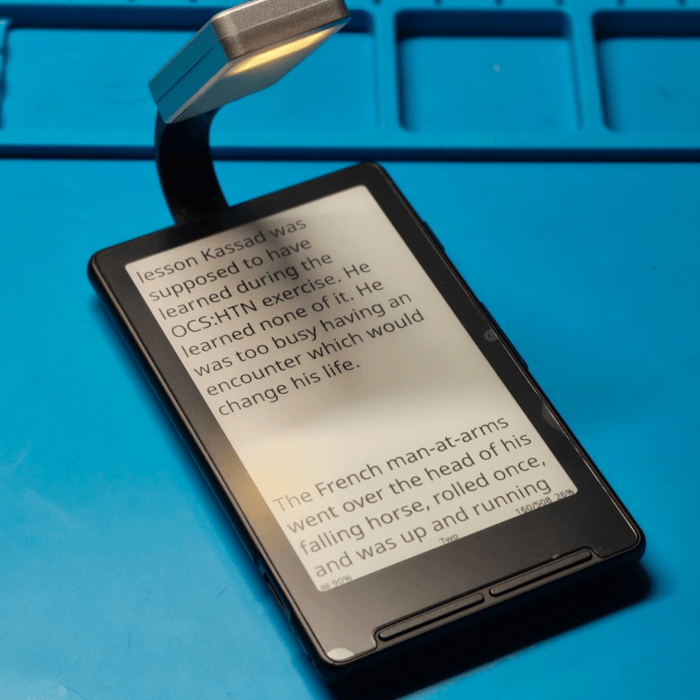
The only couple of niggles I have with the light is that it creates a shiny spot on the screen if you won't angle it just right, and it's just a little too bright. It's a little difficult to read and not disturb anyone else, but it's less disturbing than just turning on a light.
Conclusion
If you are looking for a decent little reader that doesn't cost much and can pop into pretty much any pocket then the X4 is ideal. The eink display and the low powered CPU mean that the battery lasts quite a long time. I normally read about 30 minutes a day and I've only had to charge the device a few times since I bought it back in July. The metal backing makes the device feel quite sturdy and well made.
Remember though that the screen on the X4 is tiny and so it's not really suited for anything outside of reading novels. Depending on how good your eyesight is will depend on how large you set the font, and that means how often you will need to change pages. This means that if you have poor eyesight you will be changing pages every few sentences, which can be annoying. I tried to throw some computer books onto my X4 and whilst it could open the files fine, it was a pain to navigate, view images, and read the code examples.
Where the X4 shines is if you want to read novels, especially if you are on the go or commuting. I've read 5 books since I've had the device, and I'm already 26% of the way through my current book. It's just easy to pick up my phone and the X4 and read for a bit whilst I'm travelling in a car, on public transport, or even drinking a coffee.
The screen is more than good enough to read books; it's crystal clear and doesn't have any ghosting whilst reading.

Xtelink created a cool little ebook reader and made sure it got into the hands of a lot of bloggers and YouTubers, so it soared in popularity. Whilst I don't have buyers remorse at all I can see that they were shrewd marketeers and knew how to get their product out there.

The Xteink X4 Pocket Reader is certainly a neat little device, but it's not for everyone. If you are looking for a full powered ereader with support for different book formats, a larger screen, and integration with a shop front then you are probably better off buying a Kobo reader. The standard Kobo Clara BW is certainly worth the money and you can even side load books from your own collection. Don't buy a Kindle as you will be locked into that ecosystem for good with no way to view or move your ebooks to a different device.
Unfortunately, Xteink have recently discontinued the X4 and have replaced it with the X4 classic and the X4 Pro. There is also the X3, which is a smaller device with similar capabilities to the X4. These new devices are not only more expensive than the old X4, but they also have this odd proprietary pogo pin connection and not a USB connection, which means another cable to carry around. It's a bit of a shame really. You might be able to get an X4 through ebay or AliExpress, but be careful of USB locked devices.
If you want a similar device that support CrossPoint then take a look at the M5PaperMono. I really like M5Stack and their M5PaperMono looks really good, is a totally customisable device with no locks or other blockers for hacking, and even has built in WiFi and LoRa support. The only issue is that it's never in stock!

Add new comment