Articles

What Browser Supports What CSS Styles?

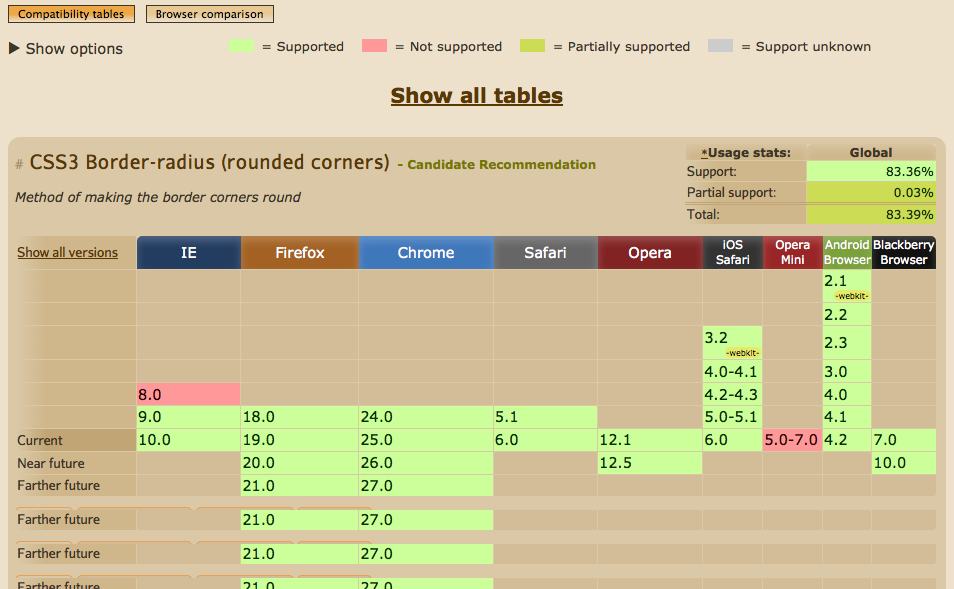
Ever sat there and pondered which browsers support what css styles? If so I’d like to quickly introduce http://www.caniuse.com. This is a great tool and sometimes the quickest way to find answers to your questions. But what about W3Schools; I hear you say. W3Schools does have a comprehensive list of styles, complete with examples of how to use them and a list of properties that you can use. However, what I find W3Schools fails on is a comprehensive outline of browser support.

caniuse.com

caniuse.com provides you with a fool-proof table of browser support. It also outlines support for mobile browsers. Possibly one of the quieter features of caniuse.com is the ‘Known Issues’ tab underneath the table. So, ever tried to get rounded corners to work on a table with a background colour on the table header cells? These known issues can help you quickly debug your css.

How I Learned To Stop Using strtotime() And Love PHP DateTime

The DateTime classes in PHP have been available since version 5.2, but I have largely ignored them until recently. This was partly due to the fact that I was working in PHP 5.1 environments a lot (don't ask) but mostly because I was just used to using the standard date functions that have always been a part of PHP (well, since version 4). I wanted to explain why I will be using the new DateTime classes more from now on and why you shouldn't be hesitant to use them.

Using a combination of strtotime() and date() can handle most things and is a good method to quickly grab a date.

Bookmarklet To Run XDebug Profiler

XDebug is a great PHP debugging tool, but it also comes with a very useful profiler that can tell you all sorts of information about your PHP application. This includes things like memory footprint and CPU load but will also have detailed information about the entire callstack of the code that was run. To enable the profiler part of XDebug you just need to set up a few rules in your xdebug.ini file.

Drupal 7: Turning Off Drupal CSS and JavaScript Aggregation With Drush

I often find that after recreating a Drupal site locally to do some testing that I have left CSS and JS aggregation turned on. This can be turned off easily enough via the performance page, but this often breaks the flow of what I am doing. As an alternative I use Drush to reset the values via the command line.

The Drush command variable-set can be used to alter any value in the variable table. The two values needed for CSS and JavaScript aggregation are preprocess_css and preprocess_js. To turn these values of we just set them to 0 like this.

Uzing Tar To Compress And Uncompress Files

The tar command can be used to compress or extract one or more files in Linux. A tar file isn't actually a compressed format, instead it is a collection of files within a single file. The tar command can take one or more files, convert them into a tar file and then compress it into a gzip file format. The file created will have the extension tar.gz.

There are a large number of flags that can be used but the main ones for everyday use are.

Checking If An Element Exists In jQuery

To verify that an element exists in the DOM you just need to use the .length property of a jQuery lookup. If the element is there then the number of elements found will be greater than 0.

if ($('.myelement').length > 0) {
}

This can be shorted by implicitly checking for a positive value of length.

if ($('.myelement').length) {
}

This is useful if you want to check that an element doesn't exist before trying to add it to the DOM. This helps to stop duplicate elements being added, which can create issues.

if ($('.myelement').length == 0) {
}

Creating Custom User Admin Actions In Drupal 7 Organic Groups

Organic Groups (OG) in Drupal 7 has a role based permission system that works on a group by group basis. This permissions system works separately to the main Drupal permission system, which can cause a couple of issues. For example, if you want to give a group role access to give other users roles then you'll need to give them the 'Administer groups' permission. The downside of this is that it overrides Drupal's core permissions to do with node deletion and allows the role to delete the group. Allowing any user to delete groups can lead to all sorts of problems so an alternative is needed.

The group people admin page (found at group/node/%nid%/admin/people) has a bulk operations form that allows users with access to the form to manage user group membership. To allow or deny a member a user just needs to select them from the list, select the action required and click Update. Here is the select statement from that page.

Load Drupal Organic Group Role By Name

I have been developing a site with the Drupal 7 Organic Groups (OG) module today and I found the need to grab a bunch of users from a group depending on their group role. The first parameter here is the group GID (not the node ID) and the second is an array of role ID's to use.

$administrators = og_get_users_by_roles($group->gid, array(4));

This is fine, but as I couldn't be sure that the role would have the same ID on my production server I needed to use a function that loaded the role ID based on the name of the role I wanted. The result of which could be fed back into the above module. It turns out that OG doesn't have a function like this (that I could find) so I wrote the following.

Force Update Of Git Repository

If you have changed or updated a git repository and want to throw away your changes then a good way of forcing the latest changes to run a combination of two commands. The first command is git fetch --all, which tells git to download the latest updates from the remote without trying to merge or rebase anything. This is followed by git reset --hard origin/master where git resets the master branch (assuming you were on the master branch) to become the version of the master branch you just fetched. Here is the two commands in full:

git fetch --all
git reset --hard origin/master

There are a few reasons why you might want to do this but should remember that any changes you have made to files in the repository will be binned in favour of the latest version.

SSH Bad Owner Or Permissions Error

After a recent update on Ubuntu I found that I was unable to use ssh due to a strange permissions error to do with the ssh config file. This was quite a problem as I wasn't able to push changes to my git server. The error was as follows:

$ ssh hostname
Bad owner or permissions on ~/.ssh/config

All that was needed was for my user only to have read and write permissions to the ssh config file. The following command fixed things for me.

chmod 600 ~/.ssh/config

If that doesn't solve things for you then you might need to also make sure that the correct user is associated with the config file.

chown user:user ~/.ssh/config