Articles

Look At PHP Execution Times With PHP Benchmark

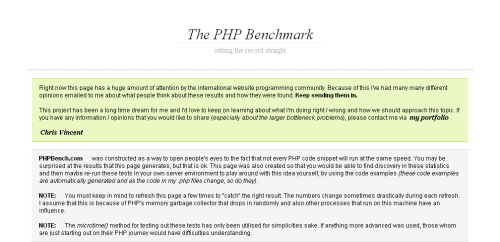
I have been doing a lot of benchmarking lately with regards to what is the most efficient way to program PHP. PHP Benchmark is a site that is dedicated to that single task.

phpbench.org

This site is in the early stages but looks very promising and deals with some of the major assumptions that programmers have about PHP, including the single and double quotes issue. I would say that most of the tests are only run a few times (around 1000) and so this doesn't give a full representative picture, but I look forward to seeing more from this site in the future.

Here are some links to my own benchmarking tests on #! code

Search And Highlight With Grep

Searching for things in many files is easy with the grep command, but in order to view the results with the expression results highlighted you need to use grep in conjunction with less.

grep expression *.txt | less +/expression

If you wanted to search all files called something.txt for the letter d you would use this line.

grep d *.txt | less +/d

Writing phpinfo() To File

The contents of phpinfo() are quite useful, and it is usually the first thing that many developers perform to make sure that PHP is installed. However, printing out the phpinfo() function can lead to a security risk because it displays a lot of information about the server.

Here is how to write the contents of the phpinfo() function to a file.

ob_start();
phpinfo();
$info = ob_get_contents();
ob_end_clean();
 
$fp = fopen("phpinfo.html", "w+");
fwrite($fp, $info);
fclose($fp);

This is an example of output buffering.

Fastest Way To Match String With PHP

There are many ways to find a string within another string using PHP, but which one is the quickest? I did the same sort of test that I have done with double or single quotes and downloading web pages with a few of the string matching functions available in PHP.

I first generated a very long string that could be used in the string matching functions. The following for loop generates a string containing "iteration 0 and iteration 1 and iteration 2..." right up until "iteration 4999 and".

$testString = '';
for ($i=0; $i < 5000; $i++) {
 $testString .= "iteration " . $i . " and ";
}

This was then passed to a number of string matching functions. This included the regular expression libraries contained in ereg() and preg_match(). The strpos() and strstr() functions were used as these are another common way of string matching, as well as some of their variants for matching case insensitive strings.


Secure Include Files In PHP

Including files in any PHP program is a very common practice and is nothing out of the ordinary. However, problems can occur when a user navigates to a script file that has a function, but is meant to be included as part of the larger program. For example, if your system includes a file to delete something then if that file is run by itself then there is a chance that it will delete everything.

Of course there are other factors like database access, global variables and sessions that would cause any script to simply error and not cause a problem. However, it is good practice to make sure that any include file is only run when it is included, and not when it is run on it's own.

The following little snipped of code can be placed at the top of any include files to make sure that it can't be run outside of an include. The file in this example would be called "test.php".

Quickest Way To Download A Web Page With PHP

There are lots of different ways to download a web page using PHP, but which is the fastest? In this post I will go through as many different methods of downloading a web page and test them to see which is the quickest.

Here is a list of the different methods.

  • The PHP curl library.
  • Snoopy the PHP web browser. Bascially a wrapper for fsockopen.
  • fsockopen().
  • fopen() with feof().
  • fopen() with stream_get_contents().
  • file() and then implode().
  • file_get_contents() function.

Each method will be run and will retrieve the contents of a web page 50 times each in order to get a decent spread of times. On each run the time will be recorded into an array, this array will then be used at the end to calculate some statistics.

Randomise JavaScript Array

Randomising a JavaScript array can be done in one or two ways. The easy way is to create a function that returns a random number and then use the sort() function of the Array object to sort the array by a random value.

// random number
function randNumber(){
 return (Math.round(Math.random())-0.5);
}
 
// create array
var numbers = new Array(1, 2, 3, 4, 5, 6, 7, 8, 9);
// print array
alert(numbers);
//randomise array
numbers.sort(randNumber);
//print random array
alert(numbers);

The sort function works by taking the randNumber function as a parameter. For every item of the array it uses this function to compare one value to the next. If the function returns a random number then the array will be sorted randomly.

The second method is slightly more complex and involves using the Fisher Yates randomising algorithm. The following function takes in an array and returns a randomly sorted array.

Merge Two JavaScript Arrays

Here is a simple bit of code that you can use to merge one or more arrays. The function you need is called contact().

Take the following two arrays, both of which contain numbers.

var array1 = new Array(1,2,3,4);
var array2 = new Array(5,6,7,8);

To join these two arrays together we use the concat() function like this.

array1 = array1.concat(array2);

The variable array1 now contains the contents of both arrays.

Loading Page Styles And JavaScript With JavaScript

One good technique when using JavaScript is to load a single JavaScript file and get this file to load any other JavaScript or CSS documents that are needed. This means that you can simplify the instillation of a script on a page by including a single file, which then loads everything else it needs. Here is how to accomplish such a task.

The basic idea is that you add the references you need to the DOM structure of the document. Let's say that we want to load a CSS file called styles.css. To do this at run time we need to create a <link> element and give it some parameters before adding it onto the end of the <head> element of the page. Here is the code needed to do this.

Using JavaScript To Select Textarea Text

This is a simple trick that will allow users to select the contents of a text area. First we need a text area.

<form><textarea name="textarea1" id="textarea1" rows="5" cols="40" wrap="off">This is some
long content.
This is some long content.
</textarea>
<br />
<input type="button" value="Select text" onclick="selectText('textarea1')">
</form>

This form also includes a button with an on click event that runs a function. This function takes a single parameter as the name of the element. It then sets the focus to this element and then selects all of the text therein.