Articles

Mask Email With ASCII Character Codes In PHP

Hiding your email address in an image is the best way of encrypting your email, but if your server doesn't support the GD2 library, or if you don't want to use it, then you might want to look at a different way of doing this.

The easiest way to encrypt your email address is to turn every character into the ASCII code equivalent and use this to display the text in HTML by putting a &# in front of each character. Here is a function that takes a string and turns it into HTML encoded text.

function maskEmail($email) {
 $hiddenEmail = '';
 $length = strlen($email);    
 
 for ($i = 0;$i < $length; $i++) {
  $hiddenEmail .= "&#".ord($email[$i]).";";
 }
 
 return $hiddenEmail;
}

To use this just feed an email address into it.

Wordpress.org

Wordpress is a very impressive blogging platform written in PHP and JavaScript. Impressive in terms of features, ease of use and stability. Wordpress comes with two default templates and two examples plugins, but you can very easily create your own templates and plugins with the Wordpress API.

Looking at the code behind Wordpress there are several classes that it uses to accomplish certain things. For example, Wordpress uses the IXR class from Incutio as a XML-RPC server/client. Doing this saves the Wordpress developers from re-writing things that other people have written so that they can concentrate on the important things.

Convert HTML To ASCII With PHP

The reverse of turning ASCII text into HTML is to convert HTML into ASCII. And to this end here is a little function that does this.

Turning ASCII Text Into HTML With PHP

Providing a text box for users to type information in is very common, but usually people want to include line breaks and links with the text and they expect the site to lay it out just as they had intended it. The following function will turn any ASCII text string into the approximate HTML equivalent.

Insert Random Data Into Rabid Ratings

Rabid Ratings is a neat ratings script written with the Mootools JavaScript framework that makes adding a rating function to any site very easy. The only problem is that when you first install the script it looks like no-one has ever visited your site to leave a rating. To combat this you can create lots of phoney data that makes it look like your site is well visited and interesting. One way to do this is by getting lots of people to vote on every rating on the site. However, a much easier way is to do this with a few handy MySQL commands.

The following query will create a random vote of between 50 and 100 for each rateable value.

Change MySQL Table Name

To change a table name in MySQL you can use the ALTER TABLE command with the parameter RENAME TO. Here is an example of a query that will rename the table "atable" to "newtable".

ALTER TABLE atable RENAME TO newtable;

You could also use the RENAME TABLE command with the same effect.

RENAME TABLE atable TO newtable;

This is also useful for renaming all of the tables in the database, just separate each table rename command with a comma.

RENAME TABLE atable TO newtable, anothertable TO anothername;

This should enable you to rename all tables in the database, perhaps with a new prefix.

PHP Function To Turn Integer To Roman Numerals

Use the following function to change any integer into a string containing the integer value as a Roman Numeral.

Preventing Image Bandwidth Theft With .htaccess

When people link to your images from their own site they are essentially using your bandwidth to show images on their site, this is also known as hotlinking.

The simplest way of preventing people from doing this is to add a .htaccess file to only allow locally linked images to be served. This checks the domain that is linking to your images by using the referrer and if the domain does not equal you own site then a different image is served, in this case blank.jpg.

RewriteEngine On
RewriteBase /
RewriteCond %{HTTP_REFERER} !^http://(.+\.)?hashbangcode\.com/ [NC]
RewriteCond %{HTTP_REFERER} !^http://(.+\.)?google\.co\.uk/ [NC]
RewriteCond %{HTTP_REFERER} !^http://(.+\.)?google\.com/ [NC]
RewriteRule .*\.(jpe?g|gif|bmp|png)$ /images/blank.jpg [L]

You can also prevent hotlinking from high traffic sites like myspace by using the following .htaccess file.

Debug Your PHP Applications With Krumo

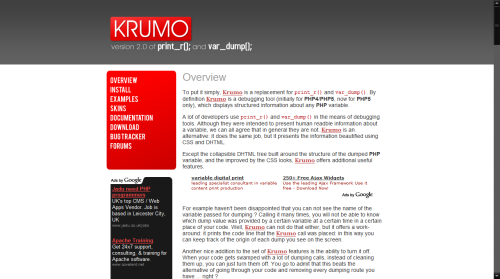
Krumo is an open source plugin for your programs that is designed as a replacement to print_r() and var_dump(). These functions are used by developers (myself included) to find out what the program is doing. The main problem is that if there is a lot of data to look at the page can get a bit busy.

Krumo

Krumo solves this by simplifying the output into a more readable format. It tells you the format of the array or object item and any other information that it can gain. It also puts the data into a set of clickable sections so that if you are interested in a particular section of output then you can click on it and see only that section.

This tool only has three files, the PHP code to integrate it into your projects, the JavaScript to create the clickable elements and the CSS to give the output some style. It is definitely worth a look.

Cut A String To A Specified Length With PHP

Cutting a string to a specified length is accomplished with the substr() function. For example, the following string variable, which we will cut to a maximum of 30 characters.

$string = 'This string is too long and will be cut short.';

The substr() function has three parameters. The first is the string, the second is where to start cutting from and the third is the amount of characters to cut to. So to cut to 30 characters we would use the following.

$string = substr($string,0,30);

The string variable is now set to the following.

This string is too long and wi

This example highlights the major problem with this function in that it will take no notice of the words in a string. The solution is to create a new function that will avoid cutting words apart when cutting a string by a number of characters.