PHP

Convert A sitemap.xml File To A urllist.txt File Using PHP

If you create a script that produces a sitemap.xml file there is no point in adapting this script so that it creates a urllist.txt file. The best solution is to use this sitemap.xml file to create the urllist.txt. The following script will do exactly this.

Create Ordinal Numbers With PHP

An ordinal number is just a way of saying that position the number is in. So for the number 1 the ordinal version of this is 1st. 2 is 2nd, 3 is 3rd and so on.

The following function will work out what ordinal text should be placed behind a number. This will be one of 'st', 'nd', 'rd' and 'th'.

function getOrdinal($number){
 // get first digit
 $digit = abs($number) % 10;
 $ext = 'th';
 // if the last two digits are between 4 and 21 add a th
 if(abs($number) %100 < 21 && abs($number) %100 > 4){
  $ext = 'th';
 }else{
  if($digit < 4){
   $ext = 'rd';
  }
  if($digit < 3){
   $ext = 'nd';
  }
  if($digit < 2){
   $ext = 'st';
  }
  if($digit < 1){
   $ext = 'th';
  }
 }
 return $number.$ext;
}

This set of if statements can be shortened by using the ternary control structure.

Remove Duplicate Entries In A PHP Array

Use the following function to remove all duplicate values in an array.

function remove_duplicated_values($array){
 $newArray = array();
 foreach($array as $key=>$val){
  $newArray[$val] = 1;
 }
 return array_keys($newArray);
}

The way this function works is by looping through the array and assigning each value of the array to be a key of a new array and setting the value as 1. As the values of the array are added to the new array any new values will lengthen the array and any duplicate values will reset to be 1.

The keys of the new array are then returned as an array of values using the array_keys() PHP function.

Here is an example of the function in action.

Hiding HTML In Command Line PHP

Printing out stuff with PHP is basically essential to any program, but problems can arise if you want to use the same script for command line scripting and web site scripting because of the need to print out HTML. The $_SERVER super global array contains a variable called SERVER_PROTOCOL, which contains the protocol that the client is using to access the script. If the client access through the web then the protocol will contain something like "HTTP 1.1". If the script is being run from the command line then this super global variable SERVER_PROTOCOL would exist.

It would therefore be possible to print out HTML or new line characters depending on if the protocol variable exists. The following function can be used instead of the print() function to print out an HTML <br /> tag when the SERVER_PROTOCOL variable exists and new lines when it is not present.

Tidy Up A URL With PHP

Lots of applications require a user to input a URL and lots of problems occur as a result. I was recently looking for something that would take a URL as an input and allow me to make sure that is was formatted properly. There wasn't anything that did this so I decided to write it myself.

The following function takes in a URL as a string and tries to clean it up. It essentially does this by splitting is apart and then putting it back together again using the parse_url() function. In order to make sure that this function works you need to put a schema in front of the URL, so the first thing the function does (after trimming the string) is to check that a schema exists. If it doesn't then the function adds this onto the end.

Clean Up A Comma Separated List In PHP

Getting users to enter a list of items is a normal practice, but getting users to do it properly is sometimes a challenge in itself. Some users will put spaces in between the commas, others will not, some will even put a trailing comma at the end of the list.

Here is some code that can be used to clear up a comma separated list using some simple regular expressions. It works using the preg_replace() function, and by passing this function an array of options patterns and an array of replacements.

$list= trim($list);
$patterns[0] = '/\s*,\s*/';
$patterns[1] = '/,{2,}/';
$patterns[2] = '/,+$/';
$patterns[3] = '/^,+/';
$replacements[0] = ',';
$replacements[1] = ',';
$replacements[2] = '';
$replacements[3] = '';
$list= preg_replace($patterns, $replacements, $list);

Take the following string, entered by a user at 2 o'clock in the morning, whilst surfing the net drunk after coming home from the pub.

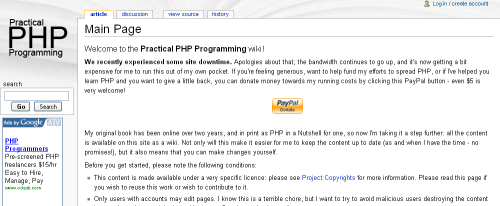
Practical PHP Programming An Online PHP Resource

Practical PHP Programming is a wiki site that has been set up to provide a central area for PHP developers to contribute to learning and understanding PHP. This site was recently called Hudzilla and was a pretty good online PHP book.Practical PHP ProgrammingPractical PHP Programming was a pretty good site when it was just static pages, people were always linking to it from the php.net site in order to explain something that wasn't clear in the documentation. I think that the decision to turn it into a Wiki can only lead to it becoming a better resource.

Add Effects To Images Using Image Filters With PHP

The imagecreatefromjpeg() function has been part of the PHP library since version 4, allowing programmers to load an image directly from a file. However, the imagefilter() has only been available since version 5 and adds a nice little set of effects to an already useful function.

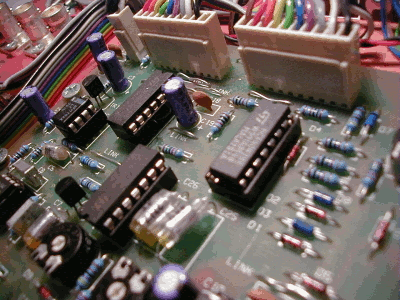
The effects are created using the function in conjunction with a set of constants. Take the following image taken from the free stock images site.

Default Electronics image

I chose this images because it has lots of colour and will show the techniques working well. To create the effects you need to use the following bit of code, in this case I am using the negative filter.

Printing Out File And Class Information In PHP

If you are debugging a PHP application then you might want more information than the values of some current variables. There are a number of built in magic variables that can be used to print out the file name, line number, class and method that the debug statement is printed out on. Here is an example that prints out some information from a class.

Optimize A MySQL Table Using PHP

In MySQL the OPTIMIZE TABLE can be used if you have made changes or have deleted large parts of the table.

Any deleted rows are kept behind the scenes in the server in order to allow the reuse of these spaces. The OPTIMIZE TABLE command reclaims the unused space and defragments the data file.

For a normal MyISAM table the OPTIMIZE command works in the following way.

  1. If the table has deleted or split rows, repair the table.
  2. If the index pages are not sorted, sort them.
  3. If the table's statistics are not up to date (and the repair could not be accomplished by sorting the index), update them.

You can do this automatically by using the following PHP code.