PHP

Posts about the server side scripting language PHP

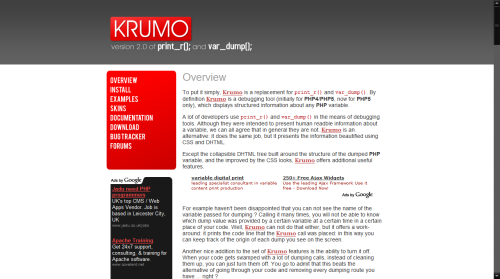
Debug Your PHP Applications With Krumo

Krumo is an open source plugin for your programs that is designed as a replacement to print_r() and var_dump(). These functions are used by developers (myself included) to find out what the program is doing. The main problem is that if there is a lot of data to look at the page can get a bit busy.

Krumo

Krumo solves this by simplifying the output into a more readable format. It tells you the format of the array or object item and any other information that it can gain. It also puts the data into a set of clickable sections so that if you are interested in a particular section of output then you can click on it and see only that section.

This tool only has three files, the PHP code to integrate it into your projects, the JavaScript to create the clickable elements and the CSS to give the output some style. It is definitely worth a look.

Cut A String To A Specified Length With PHP

Cutting a string to a specified length is accomplished with the substr() function. For example, the following string variable, which we will cut to a maximum of 30 characters.

$string = 'This string is too long and will be cut short.';

The substr() function has three parameters. The first is the string, the second is where to start cutting from and the third is the amount of characters to cut to. So to cut to 30 characters we would use the following.

$string = substr($string,0,30);

The string variable is now set to the following.

This string is too long and wi

This example highlights the major problem with this function in that it will take no notice of the words in a string. The solution is to create a new function that will avoid cutting words apart when cutting a string by a number of characters.

Get Functions And Variables Of An Object With PHP

It is possible to find out what functions and variables are available from an object at runtime using the PHP functions get_class_methods() and get_object_vars().

Take the following class called testClass.

class testClass {
 
 public $publicVariable = 'value1';
 private $privateVariable = 'value2';
 
 public function testClass()
 {
 }
 	
 public function aPublicFunction()
 {
 }
 	
 private function aPrivateFunction()
 {
 }
}

To find out the functions available from the class you can use the function get_class_methods(). This takes either a class name as a string or an instance of the object. The following bit of code will print out all of the functions in the class.

Getting The Current URI In PHP

The $_SERVER superglobal array contains lots of information about the current page location. You can print this off in full using the following line of code.

echo '<pre>'.print_r($_SERVER, true).'</pre>';

Although this array doesn't have the full URI we can piece together the current URI using bits of the $_SERVER array. The following function does this and returns a full URI.

function currentUri(){
 $uri = 'http';
 if(isset($_SERVER['HTTPS'])){
  if($_SERVER['HTTPS'] == 'on'){
   $uri .= 's';
  };
 };
 $uri .= '://';
 if($_SERVER['SERVER_PORT'] != '80'){
  $uri .= $_SERVER['SERVER_NAME'].':'.$_SERVER['SERVER_PORT'].$_SERVER['REQUEST_URI'];
 }else{
  $uri .= $_SERVER['SERVER_NAME'].$_SERVER['REQUEST_URI'];
 };
 return $uri;
}

You can use this function like this:

The Final Keyword In PHP5

PHP5 allows you to stop classes being extended or to stop child classes overwriting functions.

The first way to use the final keyword is to stop child classes from overwriting functions when they are created. This can be used to stop an important function from being overwritten. To use the final keyword here just add it to the start of function name.

class ParentClass{
 final public function importantFunction() {
  echo 'ParentClass::importantFunction()';
 }
}
 
class ChildClass extends ParentClass{
 public function importantFunction() {
  echo 'ChildClass::importantFunction()';
 }
}
 
$child = new ChildClass();
$child->printString();

Attempting to override this function will produce the following error.

Using Multiple Arguments To A Function With parse_str() In PHP

Sending multiple arguments to a function can be done using a parameter string. This is just like a URL that has data encoded into it. For example, if you wanted to send two parameters (called parameter1 and parameter2) to a function then you would use the following string.

parameter1=value1&parameter2=value2

To use this in the function you create the function as normal with a single parameter. This single parameter is the string that will contain all of your arguments.

function test($arguments)
{
}

You must run the parse_str() function on the arguments parameter to extract the data you need. You can then call the parameters by their names as variables.

Faster Way Of Checking String Length With PHP

If you want to know the length of a string in PHP you would normally turn to the strlen() function which simply tells you the length of the string.

$string = 'this is a string';
$strLength = strlen($string);

To use this to check the length of the string use the following example.

$string = 'this is a string';
if (strlen($string) < 20) {
 // code here
}

A quicker way of looking at the length of a string would be to use the isset() function in conjunction with the curly braces {} used for locating character from a string.

$string = 'this is a string';
if (!isset($string{20})) {
 // string too short
}

Because isset() is a language construct it works quicker than strlen() so this comparison has almost no overhead at all.

PHP Filter FILTER_VALIDATE_URL Limitations

I have previously talked about the filter functions available in PHP5, but failed to spot this limitation when I was doing the research for those articles. It appears that the filter to validate URL string, namely FILTER_VALIDATE_URL, is not really adequate to the task.

Take the following examples of the filter in an if statement.

if ( filter_var($url,FILTER_VALIDATE_URL) ) {
 return true;
}else{
 return false;
};

This will return true if the URL is valid and false if the URL is invalid. To test this I plugged the following URL strings into the function and recorded each of the outcomes.

Capture A Website As Image With PHP

One thing that comes in useful when linking to other websites is to use a little thumbnail of the site as part of the link. Although it is possible to do this it usually involves having command line access to the server so that you can install various different programs and extensions.

The simplest mechanism accomplish this is to use third party sites to create the thumbnail for you. Here are a few examples of free thumbnail services.

www.thumbshots.org

Thumbshots provides access to small images (thumbnail size) of many different websites. However, they are very small, with no way to change this, and can often be weeks out of date if the site has had a redesign. You can access Thumbshots from any webpage by using an image with a source that reads from the Thumbshots website.

Update Or Insert A Row With MySQL And PHP

Many situations arise where you need to either insert or update some data in a table but which you will not be certain as to which function to perform. A common solution is to do a query on the table first to see if the data exists and then insert if it doesn't and update if it does. However, this creates an unnecessary overhead in that every time the code is run at least 2 queries are run.

A better way is to try to update the table and then use the mysql_info() function to detect how many rows where updated in the query and how many rows matched the parameters in the update query.

Take the following query.

UPDATE table SET value = "value" WHERE valueId = 2;

When run on a table the mysql_info() function returns the following result.