PHP

Mask Email With ASCII Character Codes In PHP

Hiding your email address in an image is the best way of encrypting your email, but if your server doesn't support the GD2 library, or if you don't want to use it, then you might want to look at a different way of doing this.

The easiest way to encrypt your email address is to turn every character into the ASCII code equivalent and use this to display the text in HTML by putting a &# in front of each character. Here is a function that takes a string and turns it into HTML encoded text.

function maskEmail($email) {
 $hiddenEmail = '';
 $length = strlen($email);    
 
 for ($i = 0;$i < $length; $i++) {
  $hiddenEmail .= "&#".ord($email[$i]).";";
 }
 
 return $hiddenEmail;
}

To use this just feed an email address into it.

Convert HTML To ASCII With PHP

The reverse of turning ASCII text into HTML is to convert HTML into ASCII. And to this end here is a little function that does this.

Turning ASCII Text Into HTML With PHP

Providing a text box for users to type information in is very common, but usually people want to include line breaks and links with the text and they expect the site to lay it out just as they had intended it. The following function will turn any ASCII text string into the approximate HTML equivalent.

PHP Function To Turn Integer To Roman Numerals

Use the following function to change any integer into a string containing the integer value as a Roman Numeral.

Debug Your PHP Applications With Krumo

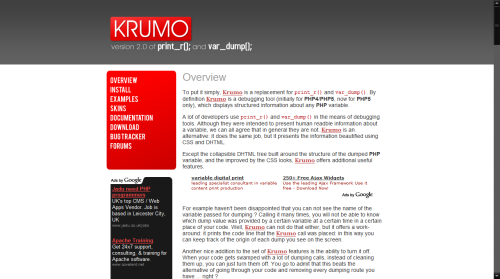
Krumo is an open source plugin for your programs that is designed as a replacement to print_r() and var_dump(). These functions are used by developers (myself included) to find out what the program is doing. The main problem is that if there is a lot of data to look at the page can get a bit busy.

Krumo

Krumo solves this by simplifying the output into a more readable format. It tells you the format of the array or object item and any other information that it can gain. It also puts the data into a set of clickable sections so that if you are interested in a particular section of output then you can click on it and see only that section.

This tool only has three files, the PHP code to integrate it into your projects, the JavaScript to create the clickable elements and the CSS to give the output some style. It is definitely worth a look.

Get Functions And Variables Of An Object With PHP

It is possible to find out what functions and variables are available from an object at runtime using the PHP functions get_class_methods() and get_object_vars().

Take the following class called testClass.

class testClass {
 
 public $publicVariable = 'value1';
 private $privateVariable = 'value2';
 
 public function testClass()
 {
 }
 	
 public function aPublicFunction()
 {
 }
 	
 private function aPrivateFunction()
 {
 }
}

To find out the functions available from the class you can use the function get_class_methods(). This takes either a class name as a string or an instance of the object. The following bit of code will print out all of the functions in the class.

Getting The Current URI In PHP

The $_SERVER superglobal array contains lots of information about the current page location. You can print this off in full using the following line of code.

echo '<pre>'.print_r($_SERVER, true).'</pre>';

Although this array doesn't have the full URI we can piece together the current URI using bits of the $_SERVER array. The following function does this and returns a full URI.

function currentUri(){
 $uri = 'http';
 if(isset($_SERVER['HTTPS'])){
  if($_SERVER['HTTPS'] == 'on'){
   $uri .= 's';
  };
 };
 $uri .= '://';
 if($_SERVER['SERVER_PORT'] != '80'){
  $uri .= $_SERVER['SERVER_NAME'].':'.$_SERVER['SERVER_PORT'].$_SERVER['REQUEST_URI'];
 }else{
  $uri .= $_SERVER['SERVER_NAME'].$_SERVER['REQUEST_URI'];
 };
 return $uri;
}

You can use this function like this:

The Final Keyword In PHP5

PHP5 allows you to stop classes being extended or to stop child classes overwriting functions.

The first way to use the final keyword is to stop child classes from overwriting functions when they are created. This can be used to stop an important function from being overwritten. To use the final keyword here just add it to the start of function name.

class ParentClass{
 final public function importantFunction() {
  echo 'ParentClass::importantFunction()';
 }
}
 
class ChildClass extends ParentClass{
 public function importantFunction() {
  echo 'ChildClass::importantFunction()';
 }
}
 
$child = new ChildClass();
$child->printString();

Attempting to override this function will produce the following error.

Get MySQL Version Information Through PHP

There is little syntactical difference between MySQL 4 and MySQL 5, but sometimes finding that difference can pinpoint a bug. The mysql_get_server_info() function will tell you what version of MySQL you are using. You can call it with no parameters, in which case it picks the most recently created MySQL resource, or with the resource handle created with mysql_connect().

Here is an example of how to use it.

$link = mysql_connect('localhost', 'mysql_user', 'mysql_password');
echo mysql_get_server_info();

You can achieve the same effect with a simple MySQL query.

$link = mysql_connect('localhost', 'mysql_user', 'mysql_password');
$query = mysql_query('SELECT VERSION() as mysql_version');

Using Multiple Arguments To A Function With parse_str() In PHP

Sending multiple arguments to a function can be done using a parameter string. This is just like a URL that has data encoded into it. For example, if you wanted to send two parameters (called parameter1 and parameter2) to a function then you would use the following string.

parameter1=value1&parameter2=value2

To use this in the function you create the function as normal with a single parameter. This single parameter is the string that will contain all of your arguments.

function test($arguments)
{
}

You must run the parse_str() function on the arguments parameter to extract the data you need. You can then call the parameters by their names as variables.